
MDM vs. EMM for Android: What Your Team Actually Needs
Compare MDM, EMM and UEM by Android workflows rather than labels. Includes application-management boundaries, vendor demo questions and an evidence-based scorecard.
AI-generated editorial scene, not a product test photograph. Device details are illustrative.
MDM usually describes mobile device management; EMM describes a broader enterprise mobility management offering that brings device, application, and data-management capabilities together. Product labels overlap. For Android, the useful buying question is whether the actual product supports your ownership model and operational requirements.
Do not rank products solely by the number of controls shown on a feature page. A team needs a workable enrollment process, required applications, appropriate policy scope, support procedures, and an exit path. A checkbox does not demonstrate that complete workflow.
This AI-assisted article draws on official platform and vendor documentation checked September 5, 2026. It provides an original evaluation method, not a vendor ranking or hands-on product review. No pricing, console behavior, or deployment performance was tested.
Use the terms as a starting vocabulary
IBM’s EMM explanation describes a suite combining device management with areas such as application, content, and identity management. It distinguishes UEM as extending management across mobile devices and more traditional endpoints. These are useful category descriptions, not guarantees about a particular subscription.
For this evaluation, use the following working meanings:
| Term | Main evaluation focus | Do not infer from the name alone |
|---|---|---|
| MDM | Enrollment, device policy, inventory and lifecycle | Every Android management mode is supported |
| MAM | Controls applied to supported applications and their data | Every installed app receives those controls |
| EMM | A broader set of mobile management workflows | Every integration is included or preconfigured |
| UEM | Management across multiple endpoint platforms | Android capabilities match every other platform |
Ask the vendor to map its terminology to concrete functions. If a product is marketed as both MDM and UEM, that is not automatically a contradiction. Resolve what it does for your devices rather than debating which label is most accurate.
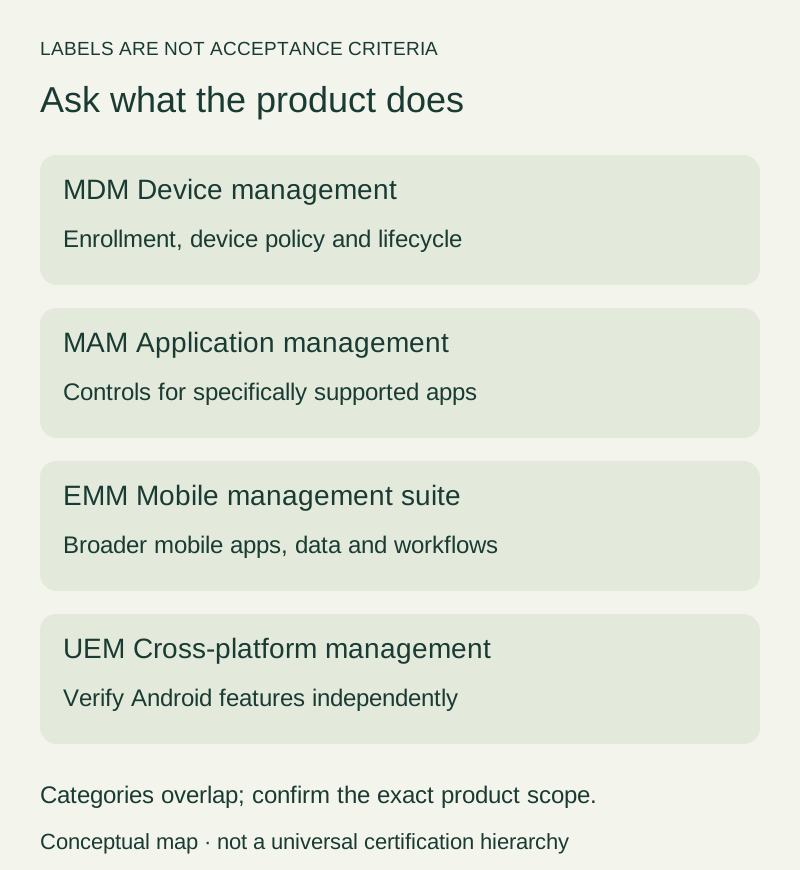
Figure 1. Working evaluation categories, not a universal product hierarchy or certification scheme.
Android ownership and management mode come first
Write down whether the handset is personally owned, company-owned with personal use allowed, work-only, or dedicated to a task. Then identify the supported management relationship you intend to use.
Our Android Enterprise guide explains those deployment situations. Keep this choice visible on every vendor test sheet. A feature demonstrated on a fully managed company phone is not automatically evidence for a personally owned work profile.
Google’s Android Enterprise feature list explicitly organizes capabilities by mode, Android version, and applicability. Use it to form precise questions about a requirement, then ask the vendor to show the matching implementation.
If the requirement involves shared or task-focused equipment, include operational recovery and the allowed application set. The Android kiosk-mode guide can help define that use case before you compare consoles.
Application protection is not the same as device management
Microsoft’s Intune app-protection overview documents app-level policies that can apply without device enrollment in supported scenarios. It also describes application and platform requirements and limitations. This is a concrete vendor example of why an app-management claim must be evaluated separately from device enrollment.
Do not turn that example into a promise that arbitrary Android apps can be protected without registration. Ask which applications are supported, whether the required integration exists, and what identity and licensing dependencies apply to the proposed design.
Also distinguish an app-level data-removal action from removing a work profile or resetting a whole device. Those are different scopes. Require the vendor to demonstrate the intended action with disposable test data before using it on employee information.
For a team needing only a defined set of supported business apps, app-level management may be worth evaluating. For a task device requiring control of the whole working environment, app protection alone does not answer all operational questions. Start from the needed outcome, not an assumption that one approach is always superior.
Turn the job into a vendor demonstration script
Choose one representative role and write the steps needed to begin and finish work. A field worker might need to sign in, open a configured application, collect approved information, and synchronize it. A shared device may need an explicit handover between authorized users.
For each step, identify the evidence you want the vendor to produce. Ask to see the device as well as the console. A policy assignment in the dashboard and the policy taking effect on a handset are separate observations.
Use this script as a starting point:
- Enroll a designated test device in the selected ownership mode.
- Sign in with an approved test identity.
- Deliver the intended application and configuration.
- Perform the representative work task with disposable data.
- Show a deliberate, safe policy change and its device-side result.
- Demonstrate a documented recovery or replacement workflow.
- Remove management or retire the device using the agreed scope.
This is an editorial evaluation sequence, not a universal enrollment procedure. Adapt the steps to the product documentation and obtain authorization for actions that remove data.
Ask what enrollment actually requires
Google’s provisioning guide describes enrollment in relation to ownership, allowed personal use, tokens, policies, and available setup methods. A vendor’s user-facing process still needs separate verification.
Ask whether the proposed enrollment starts from a new device, an existing working phone, or a factory-reset state. Identify who performs each step and which account must be available. Do not discover a reset requirement after staff have begun using production devices.
For remote deployment, ask what instructions the employee receives and how support recovers a failed attempt. For prepared devices, ask how technicians verify that the correct policy and user assignment reached the intended hardware.
If a seller or enrollment service is involved, make its responsibilities explicit. “Supports automated enrollment” should lead to a documented preparation workflow, not an assumption that every device already in your inventory can use it unchanged.
Evaluate app delivery beyond the install button
List the exact work apps, publishers, versions where relevant, and configuration requirements. Ask how the product delivers those applications in the selected mode and how users recognize the correct work instance.
Then inspect what happens after installation. Can the intended test user authenticate? Does the configuration arrive? What does the user see if configuration is incomplete? Record a device-side result rather than accepting a dashboard status alone.
For updates, ask who approves timing and how the organization handles an incompatible release. Do not demand a rollback capability without checking whether the platform, app publisher, and management solution actually support it.
Include necessary accessories in the work test. A console may manage the handset correctly while a scanner, dock, or display remains incompatible. The Android accessory checklist provides a separate equipment record for those dependencies.
Examine administrator permissions and evidence
Ask the vendor to demonstrate an ordinary support role, not only a super-administrator account. Identify who may view inventory, change policy, export records, and issue destructive commands.
Use an approved test environment to check whether the proposed role can perform its assigned work without gaining unnecessary access. If a support operator needs broader rights, document the reason and the approval process.
Request an example audit record for a test policy change. Check whether it identifies the actor, target, action, and outcome in a way your team can use. Do not assume that a log entry saying “requested” means the device applied the action.
For an offline device, ask how pending actions are represented and what confirms completion after reconnection. Treat “not demonstrated” as an open question, not as a product failure or a successful check.
Compare support effort and commercial scope
Create a list of the functions used during the demonstration and ask which subscription or add-on supplies each one. Include identity integration, remote assistance, reporting, automation, and support access where they are part of your requirement.
Request a current written quote for the intended device and user arrangement. Record whether the proposal is based on users, devices, or another unit, and how shared devices or spare inventory are treated. This article does not provide or estimate vendor prices.
Also ask about the practical support process: who opens a case, what information is required, which hours are covered, and how device-maker and management-vendor issues are coordinated. A feature-rich product can still leave an unclear operational handoff.
Compare like-for-like scope. A low headline price without a required component is not directly comparable to a quote that includes it. Preserve assumptions and exclusions so that another reviewer can reproduce the comparison.
Build a scorecard that preserves uncertainty
Separate essential requirements from preferences before seeing vendor demonstrations. Otherwise a polished interface can distract from a missing workflow.
For each requirement, record the supported mode, evidence, result, limitation, and owner of the next action. Use “passed,” “failed,” and “not tested” instead of awarding points for a verbal assurance.
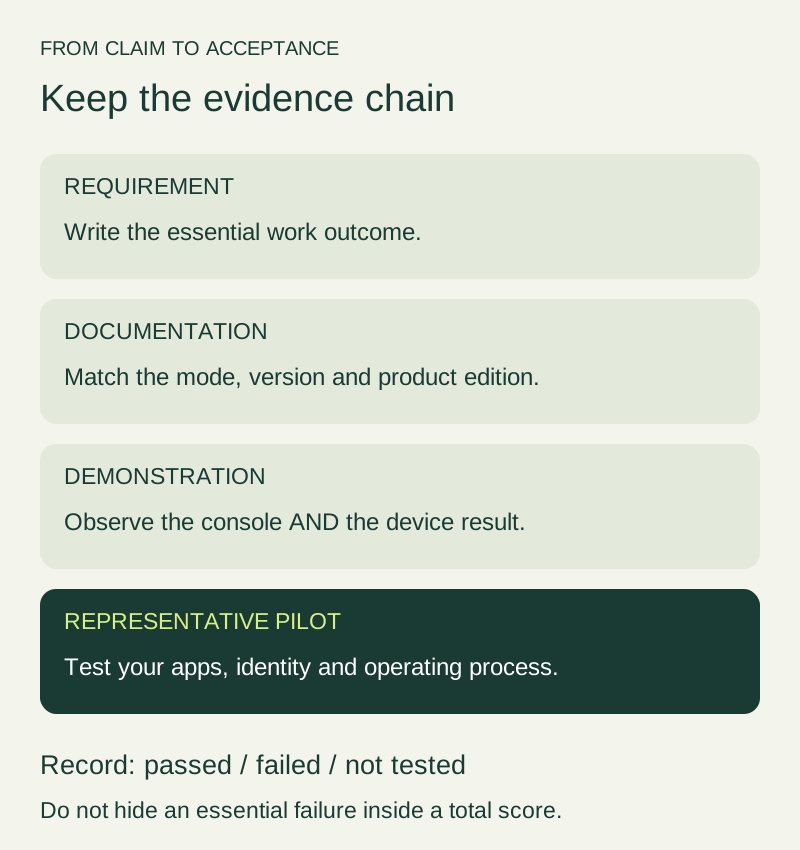
Figure 2. A vendor statement starts an investigation. A representative pilot provides stronger evidence for your deployment.
Do not let a total score hide an essential failure. A product that misses a mandatory work requirement needs a resolved alternative or an explicit decision by the responsible owner, even if it has attractive optional features.
Examples in the scorecard should remain hypothetical until tested. Do not report improved productivity, fewer tickets, or faster enrollment unless you measured the result with a stated method and comparison.
Plan migration and exit before committing
If you already manage devices, inventory the current mode, apps, policies, identities, and enrollment dependencies. Ask both the current and proposed providers about the supported transition path.
Test migration on designated devices with disposable data. Do not remove existing management across the fleet just to see whether the new enrollment works. Record what survives, what must be reconfigured, and whether a reset is required.
Assign ownership of account access, policy exports, support documentation, and device reassignment. Ask how to retrieve required records and what happens when the service agreement ends. Keep data-retention and legal decisions with the appropriate organizational reviewers.
The goal is not to eliminate every possible risk through a questionnaire. It is to make the major dependencies visible while changes are still small and reversible.
Decide from verified outcomes
A useful final evaluation names the selected Android mode, representative devices, required apps, tested workflows, costs confirmed in writing, and unresolved limitations. It explains why the proposal fits the organization’s job.
Retain the demonstration record and pilot notes. A later software or policy change can then be compared against a known baseline instead of relying on an old sales presentation.
MDM, EMM, and UEM are helpful search terms. They are not acceptance criteria. Choose the product whose documented and demonstrated capabilities meet the requirements your team has actually approved.
Frequently asked questions
Is EMM always better than MDM?
Not from the label alone. Compare the actual scope and workflows. A product’s category name does not establish whether it meets your essential requirement.
Does UEM mean Android and Windows have identical controls?
No. Require platform-specific evidence. A single console can present different underlying capabilities for different operating systems.
Can a vendor demonstration replace a pilot?
It can answer initial questions, but the representative pilot checks your actual devices, applications, identity setup, and operational process.
Should we test wipe or retirement commands?
Only on designated test devices with disposable data and explicit approval. First establish the command’s scope and recovery implications.
Sources and verification
- IBM: Enterprise mobility management — vendor explanation of category scope, not a product endorsement.
- Microsoft: App protection overview — a named example of app-level protection and its requirements.
- Google: Android Enterprise feature list — mode and version applicability.
- Google: Enrollment and provisioning — Android enrollment context.
Checked September 5, 2026. No vendor capability, migration, cost saving, or performance claim was verified through hands-on testing for this article.
Revision: added MAM boundaries, a vendor demonstration script, app lifecycle checks, evidence-based scoring, commercial scope questions, and migration safeguards.
Related articles
Android Enterprise Explained: Work Profiles, Full Management and Dedicated Devices
Choose an Android Enterprise management model by ownership and work needs. Understand work profiles, company-owned options, policy scope and pilot acceptance.
Read article
Android Kiosk Mode: What It Is and What to Plan Before Deployment
Distinguish Android screen pinning from managed kiosk deployments. Plan single or multi-app use, enrollment, network recovery and a representative acceptance pilot.
Read article
Android Auto Keeps Disconnecting: A Fix Order That Saves Time
Separate USB, wireless and app failures, test one change at a time, and prepare a useful support record before resetting Android Auto or buying replacements.
Read article